

How to Build Your Own Product Bestie
A Claude Code agent in Slack that answers your team's product and customer questions — no ticket required.

Your rep is on a customer call and the customer asks a detailed product question. The AE doesn’t know the answer, says they’ll follow up, and then spends 20 minutes tracking down an engineer or sorting through a database to find the answer. Sound familiar?
The problem
Your team is splitting their attention across CRMs, dashboards, Slack threads, and internal wikis — and still can’t get fast, accurate answers about your own product. Engineers field the same questions on repeat. CS teams interrupt each other to find customer-specific data. Product knowledge lives in too many places to be useful in the moment. The best information your company has is locked behind people, not accessible through systems.
The setup
A Claude Code agent that lives in Slack with read access to your codebase and key tools can answer most of those questions in under 3 minutes — while the rep is still on the call. Jeff Silver, CTO and Co-Founder at Opus, built exactly this. They call it Product Bestie.
And he’s sharing the recipe so you can build it, too.
Step 1: Find an engineering resource
If you’re a RevOps leader or revenue leader reading this and thinking I want this for my team — great, that’s the right instinct. But the actual build requires a technical founder, senior engineer, or CTO to set up. Your job is to define the use case and make the case for the investment. Their job is to wire it together.
The question to answer before you start: What tools does an engineer need to answer the questions my team asks most often? That list becomes the blueprint.
Step 2: Set up the four components
Product Bestie has four moving parts. You don’t need all of them on day one — but you do need to understand what each one does.
1. A Slack App — Create a Slack app with bot token scopes for reading mentions and posting replies. Subscribe to the app_mention event. This is what lets the agent “hear” when someone tags it.
2. An execution environment — A machine where Claude Code is installed with your codebase cloned and dependencies loaded. Opus uses Fly.io containers with pre-built “golden volumes” so agents spin up in seconds. A VM, EC2 instance, or even a local machine works for V1.
3. An agent definition file — A markdown file (.claude/agents/your-agent-name.md) that tells the agent what to do. Write it like you’re briefing a new hire: here’s how to read a Slack thread, here’s when to query the database, here’s what a good answer looks like, here are the formatting rules.
4. Skill files — Markdown files that teach the agent how to use specific tools. Opus gives theirs: a Slack CLI (to read and post messages), access to some anonymized customer data, , Datadog (for log and session search), Linear, and GitHub. Each skill file is essentially a how-to guide for the agent.
Example agent prompt structure:
Read the full Slack thread context.
Identify what question is being asked.
Check the codebase for relevant logic.
Query the production DB if needed for customer-specific data.
Post a reply in the thread. Be specific. If you found exact data, show it.
If you’re an engineer reading this, include what you did at the bottom.
Step 3: Lock down security before you go further
This is the step people skip. Don’t.
If your agent has read access to customer data — and it should, if you want it to answer real questions — you need to own the infrastructure. The reason Opus built on Fly.io instead of using Cursor or an off-the-shelf Claude integration is control: they know exactly what’s in the container, they control the secrets, and the container gets destroyed when the job is done. The key security principles your technical partner should be focusing on are: access scoping (no access to PII), secret management, and ephemeral execution.
Know what data your agent can touch. Know who can query it. Build the lockdown before you give reps access.
Step 4: Add observability so it gets smarter over time
Product Bestie isn’t a set-it-and-forget-it tool. Opus built an internal dashboard (they call it Magnum) where engineers can see everything the agent has done — every question, every response, every action. Reps can give a thumbs up or thumbs down on responses. A thumbs down prompts feedback, and the agent learns not to repeat that mistake.
This is the part that makes it genuinely useful over time instead of just a neat demo. If you’re not watching what it does, you’re not managing it. Build in the feedback loop early.
What good looks like
Here’s a real example from Opus. A CS rep was on a call with a new account, and was asked a question about a specific product feature. Rather than a “let me get back to you” they were able to ask Bestie and get an answer a few minutes later, before the call ended.
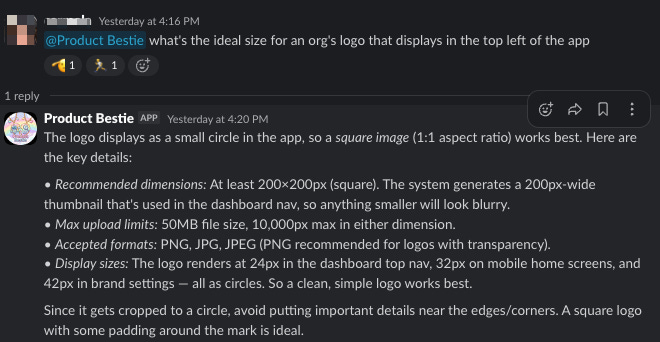
Or imagine a scenario where an AE is prepping for a renewal call and pings Bestie to surface the account’s usage trends, recent support tickets, and any feature requests from the past quarter. In just a few minutes, they have a tailored talking-points doc.
Watch-outs
Security first, always. The moment your agent can touch production data, you’re in different territory. This is not a place to take shortcuts.
Don’t try to measure ROI too early. The value shows up in rep confidence, faster answers, fewer interruptions for your engineers. It’s real — but it’s diffuse. If you’re managing closely enough to know your team, you’ll know if it’s working. Trust that.
Start simpler if you need to
If building on Fly.io feels like too much for right now, there’s a V1 path: Cursor connected to Slack, pointed at your codebase. You lose the tools that make Bestie extremely valuable, but you gain a fast, low-lift way to start answering product questions in Slack but without relevant customer information.
Jeff’s framing: “You can do this pretty easily if you want to just get answers from the codebase. Things get more complex when you start to introduce more tools, but introducing those tools is where the magic happens..”
Use the simpler version to prove the value internally. Once your team is hooked on getting answers in Slack, the case for the full build becomes easy to make.
The takeaway
The buy vs. build decision is changing fast. For years, SaaS tools won because internal builds weren’t worth the engineering investment. That math is shifting. When a technical founder can build a working V1 in an evening, and when the customization ceiling on off-the-shelf tools keeps frustrating your team, the calculus looks different.
For Opus, Product Bestie isn’t just about answering questions faster. It’s about building infrastructure where every employee spends less of their day searching for answers and more time actually solving customer problems. The companies that figure this out first are going to have a real productivity edge.
Special thanks to Jeff Silver, CTO and Co-Founder at Opus, for sharing how Product Bestie works and letting us build this How-To from his write-up and our conversation.